M&N SOFT / ENGINEERING 001
Why Are Businesses Still Running Critical Operations Through Excel — and When Is It Time for Custom Software?
Spreadsheets are one of the most useful tools ever created for business. But a spreadsheet can quietly become an operational system it was never designed to be. We examine where that transition happens, what it costs, and how custom business software can replace fragmented workflows without replacing the business itself.
THE SPREADSHEET PARADOX
Excel is not the problem.
Microsoft Excel is extraordinarily capable. Companies use spreadsheets for financial modeling, inventory, forecasting, scheduling, pricing, reporting, customer lists, transportation operations and thousands of other legitimate tasks.
The problem begins when a spreadsheet stops being a tool used by a business process and quietly becomes the business process itself.
A company may begin with one workbook. Then another employee needs access. A second copy is emailed. Someone adds formulas. Another department creates its own version. PDFs are attached to emails. Information is copied into accounting software. Status updates arrive through text messages. Someone maintains a separate Google Sheet. Management eventually asks a simple question — and nobody is entirely certain which file contains the current answer.
EXCEL → EMAIL → PDF → MANUAL ENTRY → MESSAGE → CORRECTION → EXCEL
At that point, the company does not merely have spreadsheets. It has an undocumented software system assembled from spreadsheets, inboxes, documents and human memory.
01 / HOW IT HAPPENS
Most businesses do not decide to build a manual system.
It evolves naturally. A small company needs to solve today's problem, so somebody creates a spreadsheet. This is often exactly the right decision. It is inexpensive, flexible and immediate.
Then the company grows.
Five customers become fifty. Two employees become twenty. A single location becomes several locations. A dispatcher, accountant, manager, driver, customer service representative and owner may all need different pieces of the same information.
The original spreadsheet remains, but new processes accumulate around it. The organization begins depending on people knowing where files are located, which columns matter, which formulas should never be touched and who must receive a particular email.
A manual workflow can scale surprisingly far — until the knowledge required to operate it becomes more valuable than the files themselves.
02 / THE HIDDEN DATABASE
Your spreadsheet may already be trying to become a database.
Look at a mature operational workbook and you may find customer IDs, employee records, order numbers, dates, statuses, payment information, equipment, notes, document references and relationships between multiple sheets.
Those are database concepts.
The difference is that a proper business application can enforce relationships and permissions at the system level. A spreadsheet usually depends much more heavily on conventions and user discipline.
Custom software development does not mean replacing every spreadsheet. It means identifying the information that has become operationally important and giving it a structure appropriate for that importance.
USERS → ROLES → DATABASE → WORKFLOW → AUTOMATION → AUDIT → REPORTING
03 / VERSION CONTROL
Which file is the real file?
One of the earliest signs that a company has outgrown a file-based workflow is version ambiguity.
Files named Final.xlsx, Final-2.xlsx,Updated-Final.xlsx and Final-New.xlsx are funny until the difference affects payroll, customer billing, inventory or a contractual obligation.
Cloud collaboration improves this dramatically, but collaboration alone does not necessarily create a complete operational workflow. Businesses may still need permissions, approvals, event history, notifications, integrations and specialized interfaces for different roles.
A centralized web application can make the current state explicit: there is one record, one status and a traceable history of what changed.
04 / HUMAN ROUTING
Email often becomes an invisible workflow engine.
Consider a common business process. An employee completes a form, saves it as a PDF, emails it to a manager, the manager approves it, forwards it to accounting, accounting enters values into another system and then emails somebody else to confirm completion.
Nothing about this process is inherently absurd. For low volume it may work perfectly well.
At higher volume, however, the inbox becomes a queue-management system. Employees are responsible for remembering what has arrived, what is pending, what is urgent and what needs follow-up.
Business process automation moves part of that responsibility into software. A record can enter a defined state, trigger a notification, require approval, create a deadline and become visible on a dashboard without relying on somebody remembering to forward an email.
This is one of the areas where our business process automation work focuses: not automating people, but automating unnecessary coordination between people.
05 / PERMISSIONS
Not every employee should see or change everything.
As organizations grow, access becomes more complicated. Drivers may need load information but not company-wide accounting. Customers may need their own documents but not another customer's records. Accounting requires financial data. Managers require operational visibility. Administrators need configuration access.
This is where role-based access control becomes important.
A custom business portal can present different interfaces and permissions to different users while keeping the underlying information connected.
Instead of creating separate copies of data for each department, software can provide controlled views of the same operational source.
06 / AUDITABILITY
“Who changed this?” eventually becomes a business question.
When a company is small, people often know what happened because they were in the room when it happened. Growth changes that.
Operational software can record who performed an action, when it occurred and what the previous state was. Depending on the application, audit history can cover status changes, approvals, document activity, financial adjustments and other significant events.
This can improve troubleshooting, accountability and management visibility. It can also make it easier to understand a process months after the people involved have forgotten the details.
07 / DUPLICATE ENTRY
Copying the same information twice is a signal.
A particularly useful question during software discovery is: Where does your team type the same information more than once?
A customer name may enter a CRM, then a spreadsheet, then an invoice. A vehicle VIN may appear in dispatch, accounting and claims files. Employee information may be copied from onboarding documents into payroll and another internal system.
Every duplicate entry takes time and creates another opportunity for inconsistency.
API integration and custom software can allow systems to exchange information automatically. The objective is not necessarily one giant application. Often the better architecture is several specialized systems connected by deliberate integrations.
08 / REPORTING
The question management asks should not require a day of preparation.
“How much did we make this week?” “Which jobs are delayed?” “What invoices remain unpaid?” “Which vehicles have unresolved claims?” “How many customers came back?”
When answering routine questions requires collecting files from several employees, cleaning data and manually building a report, the reporting problem is usually downstream of a data-architecture problem.
Once operational information is structured, dashboards and analytics become substantially easier to produce. The same records used by the workflow can become the source for management reporting.
09 / AUTOMATION
Automation begins with boring things.
The most valuable automation is often not futuristic. It is the repetitive work employees perform every day:
- creating documents from existing information,
- sending status notifications,
- calculating totals and deadlines,
- checking required fields,
- routing work for approval,
- generating recurring reports,
- synchronizing information between systems,
- and identifying records that require attention.
These tasks are predictable, which makes them strong candidates for workflow automation.
10 / AI
AI is more useful after the underlying workflow makes sense.
Businesses are understandably interested in AI integration, AI assistants and intelligent automation. But adding AI on top of a fragmented process does not automatically repair the process.
An AI assistant becomes much more useful when the organization already knows where its data lives, what actions users are allowed to perform and what the workflow is supposed to accomplish.
AI can then assist with document understanding, classification, natural-language search, content generation, anomaly detection, summarization and decision support while conventional application logic handles deterministic business rules.
Our approach to AI integration for business is therefore usually connected to the larger software architecture, not treated as an isolated chatbot project.
REAL PRODUCT / DRIVER PORTAL
Transportation makes the problem easy to see.
Transportation companies can accumulate an extraordinary amount of operational information: drivers, loads, vehicles, brokers, customers, rates, settlements, expenses, documents, claims, equipment and compliance-related records.
These workflows frequently cross the boundaries between dispatch, drivers, accounting, fleet management and ownership.
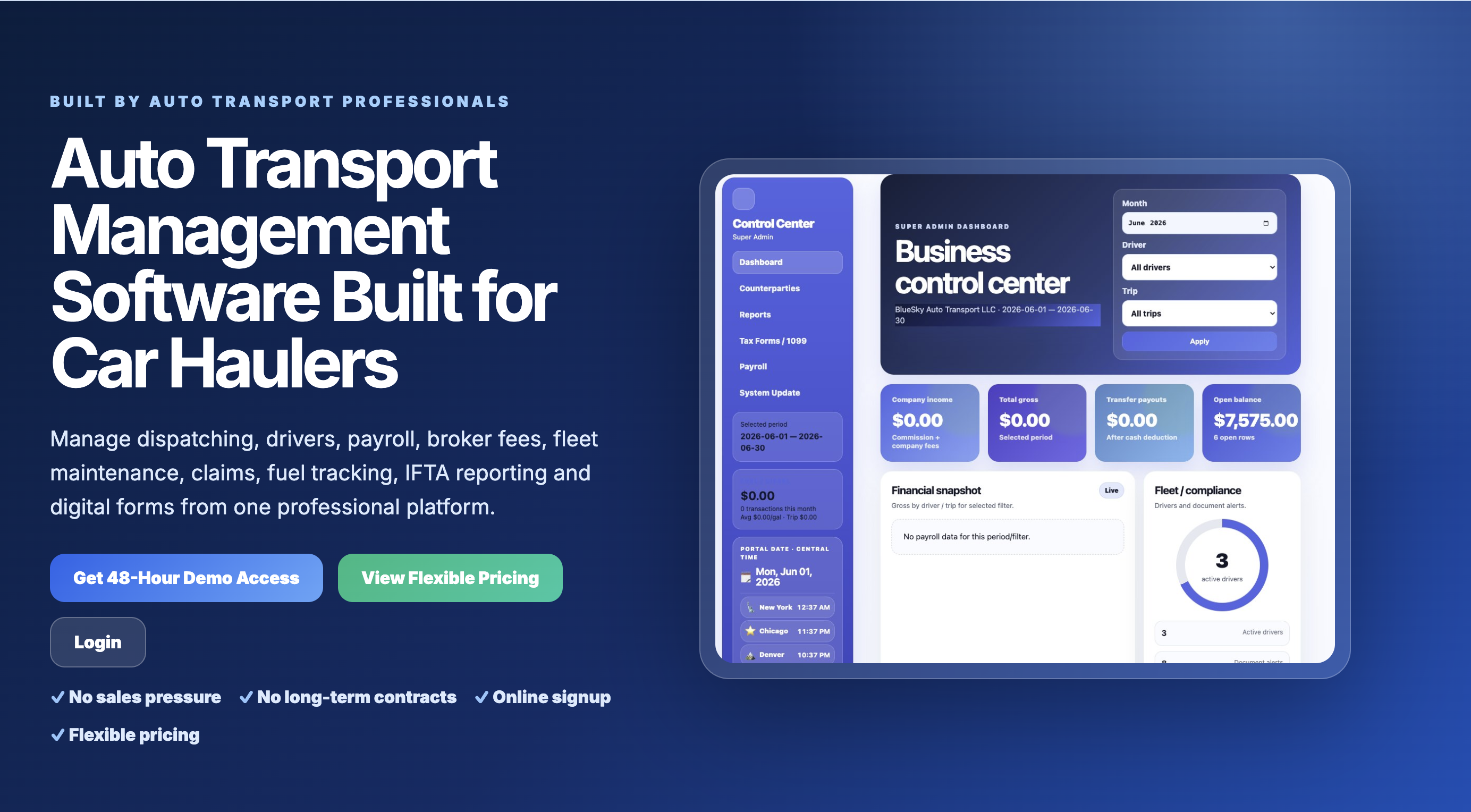
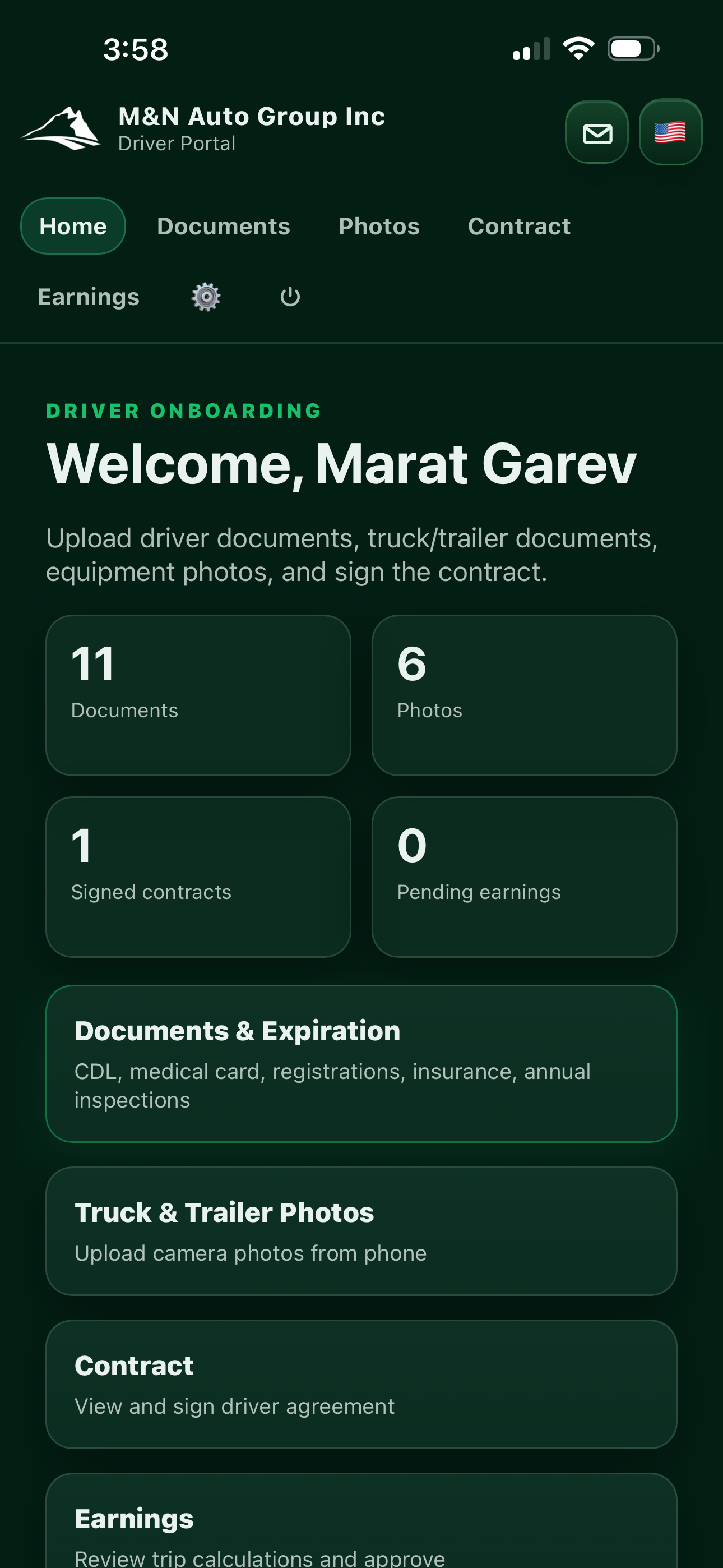
M&N Soft's Driver Portal is an example of the architectural idea described throughout this report: instead of treating every department as an isolated spreadsheet, the platform connects operational records while preserving role-specific workflows.
Read the Driver Portal transportation software case study or explore our custom transportation software development capabilities.
THE DECISION
When should a business actually build custom software?
Not every company needs custom software. Sometimes Excel is the best solution. Sometimes an existing SaaS platform solves the problem more economically. Buying software should be considered before building software.
Custom development becomes more compelling when the workflow itself creates competitive or operational value and existing products force the company into significant compromises.
REPEATED ENTRY · MULTIPLE FILES · MANUAL APPROVALS · ACCESS COMPLEXITY · REPORTING DELAYS · HIGH VOLUME · UNIQUE WORKFLOW · INTEGRATION GAPS
Another strong signal is organizational dependence on a particular employee who understands the entire manual process. If that person taking a vacation can stop an operation, the company may not have a staffing problem. It may have a systems problem.
BUILD VS BUY
Custom software should earn the right to exist.
Building software simply because custom software sounds impressive is a poor investment.
A development project should have a reason: reduce operational friction, create capabilities unavailable in existing software, integrate fragmented systems, improve customer experience, enable scale or support a business model that generic software cannot model effectively.
During discovery, we therefore look not only at what software a company wants, but at why the current process exists and which parts actually deserve to change.
Learn more about our custom software development services and custom web application development.
ARCHITECTURE
A modern internal business system can be surprisingly simple.
A typical system may consist of a secure web application, database, authentication, role-based permissions, document storage, APIs, notifications and an administrative dashboard.
Mobile applications can be added when employees work in the field. External customers can receive their own portal. Existing accounting, CRM, payment or logistics systems can remain in place and connect through integrations.
EMPLOYEE / CUSTOMER → WEB OR MOBILE APP → API → BUSINESS LOGIC → DATABASE → INTEGRATIONS → ANALYTICS
The technology is important, but architecture begins with the operation. A beautifully engineered application that models the wrong workflow is still the wrong application.
SECURITY
Moving away from spreadsheets does not automatically make data secure.
Custom systems introduce their own responsibilities. Authentication, authorization, backups, encryption, dependency management, logging, infrastructure security and software updates all require deliberate engineering.
Security therefore has to be considered during architecture rather than added as decoration immediately before launch.
M&N Soft also works with server and IT infrastructure, which allows application architecture and deployment architecture to be considered together.
MIGRATION
You do not need to throw the spreadsheet away on day one.
One of the safest approaches to modernization is incremental.
A company can begin with one painful workflow, build a system around it, import the relevant data and allow the old process to coexist temporarily while the new application is validated.
Additional modules can then be introduced as the organization becomes comfortable with the platform.
Digital transformation does not have to mean a giant multi-year replacement project. For many small and mid-sized businesses, a focused internal portal can deliver value much earlier.
WHAT TO MEASURE
Software success should be visible in the operation.
A new system is not successful because it uses a modern framework. It is successful when something about the business becomes measurably better.
Useful measures may include processing time, duplicate data entry, error frequency, employee hours, response time, reporting time, onboarding speed, document completion, customer conversion or the number of manual steps required to finish a task.
Those measurements also help determine which feature should be built next.
M&N SOFT VIEW
The goal is not more software. The goal is less operational friction.
Businesses do not need custom software merely because they use spreadsheets. They need it when the cost of coordinating the existing process begins exceeding the simplicity that made spreadsheets useful in the first place.
The best internal software often feels less like a new technology and more like the workflow the company always wanted to have.
That is the engineering problem we find interesting: understanding a real operation deeply enough to turn scattered information, repetitive work and institutional knowledge into a system people can actually use.
PRIMARY SOURCES & REFERENCES
Technical references used in this Engineering report.
These sources provide additional background on spreadsheet data transformation, role-based access control, modern access architecture and secure software design.
Microsoft Support — Power Query for Excel ↗
Microsoft Learn — Power Query documentation ↗
NIST — Role-Based Access Control (RBAC) ↗
NIST SP 800-207 — Zero Trust Architecture ↗
CISA — Principles and Approaches for Secure by Design Software ↗
FURTHER READING